¶ Migration from Wéčko to SPIN or QASIDA ERP
¶ Introduction
The Migration category describes which data and in what way will be transferred from W to the SPIN2 system.
Data migration is currently prepared only for migration at the beginning of the year; opening balances are migrated.
Two methods of data transfer are used:
- Import via script
- XML import in SPIN
Data import must be performed in the agreed order.
¶ PART I – XML Import Is Not Available in SPIN
All code lists and data of all modules for which XML Import is not available in SPIN will be migrated from WÉČKO using a script that requires the packages pkdlmigracia.sql and pkdlosobaimport.sql.
Exported files from WÉČKO are imported into SPIN via SQL under DL:
A PRG set that is run in WÉČKO creates the scripts migracia.sql, osoby.sql, pkl.sql (run over the NAP module via global add-on options).
The name of the add-on option is – SPIN Migration Common Code Lists.
¶ Common
- Organizational structure
- Banks – financial institutions
After importing companies (handled in Part II), the second script osoby.sql can be executed.
- Person – persons are imported, including their permanent address, contacts, link to company, bank accounts; the person number may be filled in or empty.
¶ UCT
- Document types
¶ NAP (SOF)
- NAP document types
- AU groups (accounting type) – transfer via SPINUD additional data
- NAP periods
- Warehouse code list – transfer via SPINSK additional data
- Units of measure code list
- Customs groups code list (valid only)
¶ PKL
- Cash book
- Cash document item type
- Receipt item type
¶ MAJ (Assets)
- Depreciation group
- Production classification code
- Accounting identification
- Asset category
- Movement types
¶ PART II – Via XML Import Function
Data that have the Import XML function available in SPIN will be exported from WÉČKO in the corresponding XML structure, or other structures (csv, txt).
XML files are created in WÉČKO by a set of PRG files in the CMPL directory, run via Global Add-on Options.
This includes:
¶ Common
(run over the NAP module)
- Economic objects – add-on option name: SPIN EO Migration
- Company code list, transferred together with: addresses, contacts, bank accounts – add-on option name: SPIN Company Migration
¶ UCT
(run over the UCT module)
- Chart of accounts – add-on option name: UCT export of chart of accounts to XML for SPIN
- Opening balances GL – add-on option name: UCT export of accounting documents to XML for SPIN
¶ NAP
(run over the NAP module)
- Product and price list code list – add-on option name: SPIN Products and Price Lists Migration
The result is prod.xml and cennik_pc.txt.
- Opening stock balances – add-on option name: SPIN Opening Stock Balances Migration
- Supplier invoices – opening balances SI – add-on option name: SPIN Supplier Invoices Migration
- Customer invoices – opening balances CI – add-on option name: SPIN Customer Invoices Migration
¶ PAYROLL
(run over the PAYROLL module)
- Employees – add-on option name: SPIN Employee Export Migration
- Deductions – add-on option name: SPIN Deduction Export Migration
- Family members – add-on option name: SPIN Family Members Export Migration
¶ ASSETS
(run over the ASSETS module)
Export is performed via Code Lists – Run Add-on Options.
- Locations – add-on option name: ASSET Export Asset Locations, creates file expum.csv
- Fixed Asset Status – add-on option name: ASSET Export Asset Status – select FA, creates file expmatrH.csv
- Operational Records Status – add-on option name: ASSET Export Asset Status – select Operational Records, creates file expmatrD.csv
- Asset Accessories – add-on option name: ASSET Export Asset Accessories, creates file expprisl.csv
¶ WORK PROCEDURE
¶ Tools Required for Import and Migration Order
- package pkdlmigracia.sql to be run on the DB (on request, not included in total)
- package pkdlosobaimport.sql to be run on the DB (required – referenced by pkdlmigracia.sql even if persons are not needed)
- set of glomisp*.PRG files. These are run in WÉČKO via global add-on options (AO) (run over the NAP module).
AO option over WNAP – SPIN Migration Common Code Lists:
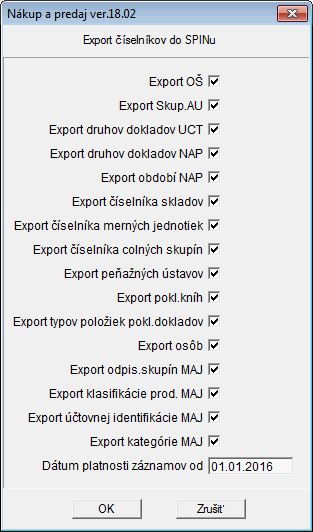
Uncheck items you do not need to migrate.
The following scripts are created:
- Script migracia.sql – basic script migrating code list data from Part I – run first
- Script osoby.sql – migrates person code list. Must be run only after importing companies (handled in Part II)
- Script pkl.sql – chart of accounts must be imported before running it (handled in Part II)
After migrating code lists (Part I), start migrating data for which XML IMPORT is available in SPIN (Part II).
Follow the order of modules and data as described above in Part II.
Migrated data are imported into SPIN in the following order:
| Import order | File name | Where it was created |
|---|---|---|
| 1. | migracia.sql | WNAP AO – SPIN Migration Common Code Lists |
| 2. | eo.xml | WNAP AO – SPIN EO Migration |
| 3. | firmy.xml | WNAP AO – SPIN Company Migration |
| 4. | osoby.sql | WNAP AO – SPIN Migration Common Code Lists |
| 5. | ur.xml | WUCT AO – UCT export of chart of accounts to XML for SPIN |
| 6. | pkl.sql | WNAP AO – SPIN Migration Common Code Lists |
The company ID (IČO) of the tenant in WÉČKO must match the company ID of the tenant in SPIN.
¶ Detailed Description of Migrated Data by Module
¶ Common
- OS: conversion via additional data defined in WÉČKO is possible, data code = SPINOS, type = character.
- EO: conversion via additional data defined in WÉČKO is possible, data code = SPINEO, type = character.
Before exporting EO, check whether any category code matches an EO code. If so, an error will occur during import into SPIN.
During export, select what will be exported:

Company:
- only active companies are exported
- suppliers/customers or used companies are exported; if a company is exported, its branches are also exported
- if the company has a Company ID, internal code = Company ID, otherwise internal code = idallsubj
- if the company is a branch, "_ " and the branch code are added to the internal code and the parent company is filled in SPIN

- company type is filled as follows (company type codes must be set in SPIN):
- if it is a person, company type code = FO
- if the company name contains "R.O", company type code = SRO
- if the company name contains "A.S", company type code = AS
- otherwise, company type code = INE
- city–country linkage is based on the abbreviation in the PREFIXIC field in ALLSTAT.DBF and must be filled correctly
- place of business is filled into the second address
- contact types are transferred as follows:
| Type in WÉČKO | File name |
|---|---|
| FAX, FAXM | FAX |
| MOBIL | MOBILE |
| TELM | MZD |
| TEL-D | HOME |
| all others | WORK |
- supplier/customer records are filled with the number of due days from supplier/customer info
- bank accounts are exported as follows: only valid bank accounts are exported; BBAN is recorded
After import, a script must be run to convert BBAN to IBAN.
Person:
- persons are imported, including permanent address, contacts, company link, bank accounts
- the person number must be filled for ASSETS and PAYROLL import, filled as follows:
- if employee: if a person exists in MZDZAMKU, value from OSCIS field is used, otherwise from ALLSUBJ → internecis
- if still empty, the last 10 characters from IDALLSUBJ are used
- if not an employee, value from ALLSUBJ → internecis is used; if empty, the number is not exported
- during import into SPIN, if the personal number is empty, duplication is checked only by first name + last name
¶ UCT
Chart of accounts
- analytical account length must be set in program parameters DL_SETUP_DLZKA_AU
Opening balances GL:
- an accounting period must be created in SPIN
- a new year must be created in WÉČKO and an opening balance document for the general ledger must be created
- in export arguments, set Date from and Date to = empty, Opening balance date = 1.1. of the respective year; other arguments remain unchanged
¶ NAP
- Warehouse code list – conversion via SPINSK additional data
- Units of measure code list
- Customs groups code list (valid only)
- Product and price list code list – during export, you choose whether to export all products or only those with a stock card in the current year:
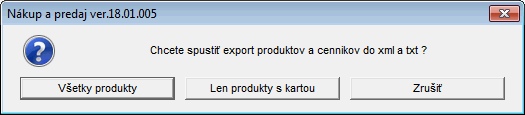
For product, the following is exported (prod.xml):
- product code
- name
- type = first character from SU group
- accounting type = if SPINUD additional data exists for AU group, its value is used; otherwise SU group + AU group
- unit – if not filled, defaults to pcs
- weight
- stock_flag = if SU group is service, N; otherwise A
- VAT rate = according to VAT type and valid rates
- VAT type = 0,1,2 (as filled in W)
In SPIN, settings must be completed under VAT – Import DD Settings.
For Import DD – WS_PRODUCT record, switch to the Codes for Import Items tab and set VAT rates for import item DD codes from WÉČKO – 0,1,2.
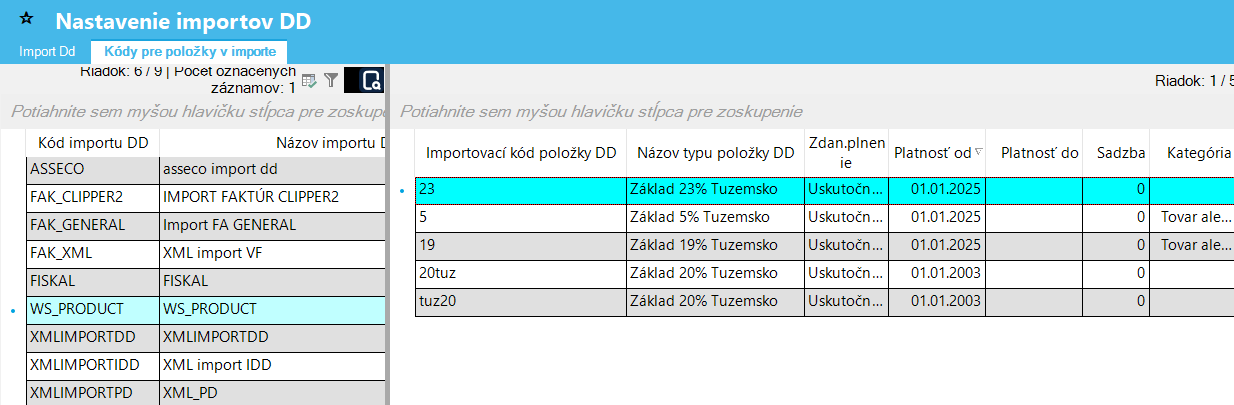
- unit2 – filled with the first unit from the units tab if it exists
- description = name2 + description from product code list
- ean – if filled, the ean element is filled and used for the base unit
- customs tariff
Price list is exported to txt:
TXT files are created for the base price list (cennik_pc.txt) and additional txt files for all price codes used in the price list (cennik_ + price code.txt). They are then loaded into SPIN via “external import”.
Data in txt:
- product code
- sales price
- quantity from (always 0)
TXT files are assigned to SPIN price lists during import (each file may represent a different price list in SPIN).
- NAP document types
- AU groups (accounting type) – conversion via SPINUD additional data
- NAP periods – creates all periods in the current year
- Opening stock balances
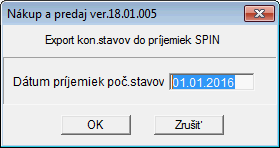
Enter the date in the window. Non-zero stock card balances for all warehouses with receipt type set via SPINDD warehouse additional data are exported to pocstavskl.xml.
1 warehouse = 1 receipt
Receipt header:
- document number = "PS" + sequential number within export
- document type = warehouse additional data SPINDD
- date = entered during export
- company internal code = own company ID
- warehouse = warehouse additional data SPINSK, otherwise warehouse number from W
- os = warehouse additional data SPINOS, otherwise empty
- eo = warehouse additional data SPINEO, otherwise empty
Items:
- product = product code
- quantity = current quantity
- stock price = current stock price
- batch = serial number, if filled in W
- expiration date = validity date, if filled in W
- os = warehouse additional data SPINOS, otherwise empty
- eo = warehouse additional data SPINEO, otherwise empty
Supplier invoices – opening balances SI

Unsettled balance account variant:
- bank account – IBAN is not taken from invoice but default or first from balance
- issue date is taken from invoice; if not found in book, from balance item
- due date is taken from invoice; if not found, from balance header
- tax date is taken from invoice; if not found, from balance item
- contract number is limited to 20 characters
- advance invoices – if DU for account SPINSAL = ZAL or account is marked as advance, invoice is recorded as advance (poc_stav=N, typ_fa=ZD)
- exchange rate differences at year-end – recorded into advances; if amount is on credit side, sign = minus
Customer invoices – opening balances CI
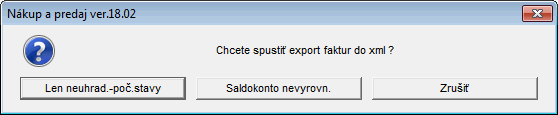
Unsettled balance account variant:
- document type is taken from SPINDD additional data of chart of accounts for balance account
- bank account is taken from invoice (if exists in current year) or from own company (default or first found)
- product is not filled in invoice item
- issue date is taken from invoice; if not found, from balance item
- due date is taken from invoice; if not found, from balance header
- tax date is taken from invoice; if not found, from balance item
- tenant element is filled
- contract number is limited to 20 characters
- exchange rate differences at year-end – recorded into advances; if amount is on debit side, sign = minus
¶ PAYROLL
¶ ASSETS
- depreciation group – emo_odp_skup, creates required records for current legislation; content is not read from WÉČKO
- production classification code – sof_kp, creates required records from MAJKLASP.DBF, field KKP
- accounting identification – emo_ui, created via script from MAJDENNI.DBF, kod_ui = account without separators, name from UCTUR
- asset category – emo_kategoria – creates one fixed record with code ZAKLW for each typ_ep (150,170), also sent to asset via csv
Import of *.csv files into SPIN in the following order:
You are in the same period for which the export was performed.
Location
- Data loading
- In Assets → Asset Import, switch to the Location Import tab
- Enter input file expum.csv located in the export/import path
- Investment asset, All rows, Opening balance classification
- Confirm Load icon
- Location Code and Name are loaded
- 5-character object code, alltrim (5 characters of room code); location is also applied to asset status
- If another method is required, it must be adjusted in both places
- Data saving
- Confirm Save icon
- Status column shows Saved, Error column is empty
- SPIN confirms data saved and asks whether to save changes
- After confirmation, changes are saved
- Repeating the process will result in a duplicate record message
Asset status
- Export from WMAJ via AO, select FA or Operational Records:
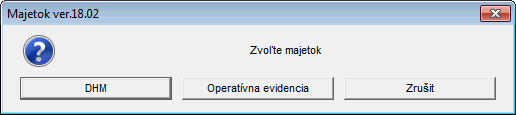
- Loading FA data
- In Assets → Asset Import, switch to the Asset Import tab
- Enter input file expmatrH.csv located in the export/import path
- Investment asset, All rows, Opening balance classification
- Confirm Load icon
- If SPIN reports invalid input file, auxiliary files are available for detailed error specification
- Loading Operational Records data
- (In preparation)
- Data saving
- Confirm Save icon
- Status column shows Saved, Error column is empty
- SPIN confirms data saved and asks whether to save changes
- After confirmation, changes are saved
- If a message appears in the Error column, it must be handled according to its content
Accessories
- Data loading
- In Assets → Asset Import, switch to the Accessories Import tab
- Enter input file expprisl.csv located in the export/import path
- Investment asset, All rows, Opening balance classification
- Confirm Load icon
- Data saving
- Confirm Save icon
- Status column shows Saved, Error column is empty
- SPIN confirms data saved and asks whether to save changes
- After confirmation, changes are saved
- If a message appears in the Error column, it must be handled according to its content
¶ IMPORT LOGGING
Verification of imported data.
XML log is stored in dl_log (code1='MIGRACIAW').
View it via Administrator – Journal of Performed Actions.
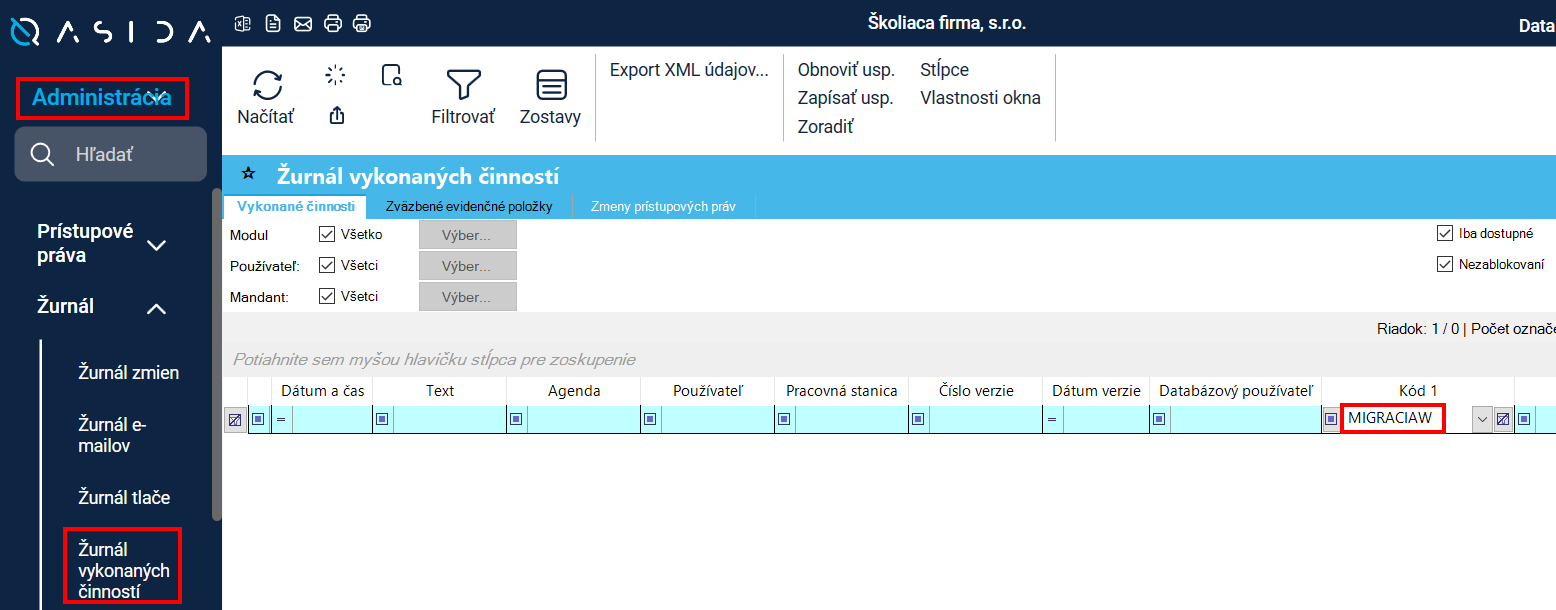
Export records to XML and save (Export XML data…).
Example of logged XML:
<?xml version="1.0" encoding="windows-1250"?>
<migracia>
 <zaznam skupina="OŠ" hodnota="405" vysledok="importovaná" />
 <zaznam skupina="OŠ" hodnota="410" vysledok="importovaná" />
 <zaznam skupina="Druh UD" hodnota="BANKA" vysledok="importovaný" />
 <zaznam skupina="Druh UD" hodnota="CSOB" vysledok="importovaný" />
 <zaznam skupina="Banka" hodnota="EXSR" vysledok="už existuje" />
 <zaznam skupina="Banka" hodnota="SPWT" vysledok="už existuje" />
</migracia>
At the same time, it is also written to the log _migr.txt