¶ QASIDA START - first Launch and Migration from Wecko to QASIDA
This guide provides technical Steps for Migration from Wecko to QASIDA (Environment Setup Process After Purchase):
¶ Wecko Export
The tutorial is available here: https://qasidaerpwizard.assecosol.eu/#/detail/tutorial-export
¶ Qasida Import
The tutorial is available here: https://qasidaerpwizard.assecosol.eu/#/import?name=asseco-wecko
¶ Recommendations for the Customer
¶ First Launch of the QASIDA Start Application
- Launch the installed QASIDA Start application by double-clicking it.
- Enter the login credentials - Login name: QasidaAdmin
a) password for standard installation: AssecoAdminSKXE_2024
b) password for PUBLIC installation: InstallPublicXe_2024 - Click the Log in button.
- After logging in, you must change the password. The password must contain lowercase letters, uppercase letters, numbers, and a special character.
- You must approve the company details.
- If you will be working with multiple users, create them according to the instructions in the Application Guide – New User Setup.
- If you will be working with multiple tenants, create them in the Tenant window according to the instructions in the Application Guide.
- Import data exported from Wéčko, or (for non-Wéčko customers) prepare data in predefined structures. Guide.
¶ Changing Access Credentials
- Windows: A password change is required upon the first login of the user to the operating system.
- QASIDA ERP: A password change is required upon the first login of the user to QASIDA ERP.
- Users in QASIDA ERP: Passwords should be changed as needed.
- Changing Access Credentials for QASIDA.Api: If it is necessary to change the credentials that QASIDA.Api uses to access the database, follow these steps:
- Change the user's password in the Oracle database.
- Update the password in the configuration files.
¶ Add-ons module - Specific Post-Migration Settings from Wéčko
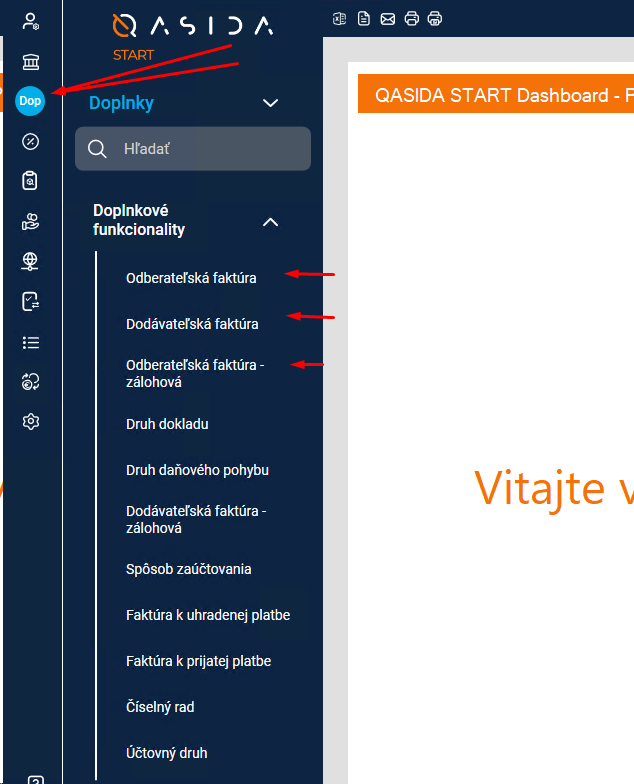
If you did not have the warehouse module installed in Wéčko, but used invoicing within the Accounting module, the invoicing-related working windows in QASIDA START are located in the** Add-ons module**.
This mainly includes:
- customer invoices,
- supplier invoices,
- advance invoices,
- opening balances for invoicing,
- document type configuration.
If you are using only payroll in QASIDA START, the basic accounting windows, such as:
- chart of accounts setup,
- accounting period setup,
are also located in the Add-ons module.
¶ Backup Configuration
- The database is automatically backed up daily at 9:00 AM to the local disk
C:\Backup\\. - We recommend regularly copying the backup files from this folder to an external hard drive, USB stick, or network storage.
- The backup type is Full Backup.
- To modify the backup schedule or frequency, adjust the job settings in Windows Task Scheduler under "Asseco Solutions database jobs".
- This job also deletes old backups, with a retention period of 60 backups.
¶ Monitoring Backup Results
-
Check the status of the jobs in Task Scheduler (should indicate "The operation completed successfully").
-
The backup script generates two types of logs:
- Simplified log: Contains only the start and end time of execution and whether the backup was successful.
- Detailed log: Provides a technical breakdown of each step performed.
-
Log file locations:
- Simplified log directory:
%BACKUP_DESTINATION%\log(e.g.,C:\Backup\log) - Detailed log directory:
%ORACLE_BASE%\etc\log(e.g.,C:\QASIDA\oracle\etc\log)
- Simplified log directory:
In case of backup failure, refer to the detailed log for troubleshooting.
¶ Procedure for Connecting to Your Network and Accessing from Another Computer
¶ etc/hosts
By default, on the computer running QASIDA ERP, the etc/hosts file (located at C:\Windows\System32\Drivers\etc\hosts) contains an entry named "qasidaerp", which points to 127.0.0.1. This "qasidaerp" name is used for client connections to the database and for configuring application components (e.g., Jasper Server). This setup is sufficient when using the client on the same computer. However, if clients need to be run from other computers, the target computer must be connected to your network.
If you connect this computer to your network, you must ensure that the DNS record "qasidaerp" points to the actual machine hosting the QASIDA ERP solution (database). This can be achieved by adding an entry to the etc/hosts file or configuring your DHCP server accordingly.
The computer hosting QASIDA ERP already has firewall rules enabled to allow access to the database and application components. These rules permit incoming connections on the following TCP ports: 1521, 8888, 8083.
In your network infrastructure, you must allow network communication to this machine on these specific ports (1521, 8888, 8083).
Finally, you simply need to copy the QASIDA ERP client files (C:\QASIDA\Client and C:\ProgramData\AssecoSolutions\SPIN.NET\user.config) to the target computer and launch Qasida.exe.
¶ Network Access Configuration
The computer running QASIDA ERP must have access to the following addresses:
*.assecosolutions.sk
¶ Antivirus Program Recommendations
Antivirus software can cause various issues with the database, primarily due to file scanning, which may lead to performance degradation, crashes, or temporary database suspension.
It is recommended to:
- Exclude the entire database directory (
C:\QASIDA\oracle) from antivirus scanning. - Alternatively, consult the antivirus software vendor to configure scanning settings that do not interfere with the functionality and performance of the database.